By
By Apparently unaware that they can save their data securely, in their own house, on their own network, and without any ongoing fees, millions of consumers pay monthly to store their data in the cloud. You only need to connect your router to a NAS box (Network Attached Storage), such as the TerraMaster F2-425 reviewed here.
You can back up your images, videos, and other data from any of your devices to the NAS, stream movies and music to any networked display, smart TV, or speakers, and keep the NAS in a physically secure place. The nicest thing is that you don’t have to entrust your data to a broadband provider or a big company that, to be honest, wouldn’t care about it if you weren’t paying them to store it.
Specifications
If you’re unfamiliar with a NAS box, it’s essentially a small computer intended for data distribution and storage—a file server, to use the colloquial term—though it’s capable of much more. An Ethernet cable or, in certain situations, Wi-Fi is used to connect the NAS (the F2-425 is hardwired only). You can use your operating system’s network browsing feature (such as Windows Explorer, the MacOS Finder, etc.) to view the files on a NAS box, and you can use a Web browser to manage it or access its virtual machines and applications.
Although the F2-425 features an HDMI connector, it is solely utilized for terminal (also known as command line) use. In certain situations, you can connect a keyboard using the NAS box’s USB connection and a monitor using its DisplayPort or HDMI. This NAS machine lacks direct streaming media output and a graphical interface, in contrast to certain others.
Mostly made of plastic, the all-black TerraMaster F2-425 has some metal framing to hold the parts together. It weighs a little less than four pounds unpopulated (that is, before you add any of the drives that are required for storage) and is approximately nine inches long, five and a half inches high, and four and a half inches broad.
I would love to say that it is made with durability; however, after just a few drags over the hard terrain shown in the pictures, one of the rubberized feet started coming off. It’ll work, but don’t put it in the back of your jeep and hope it survives off-road.
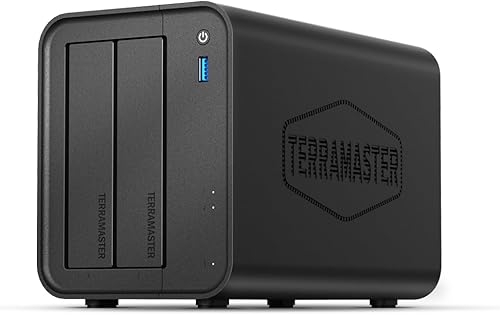
TERRAMASTER F2-425 2-Bay NAS Storage – Intel x86 Quad-Core CPU, 4GB RAM, 2.5GbE LAN
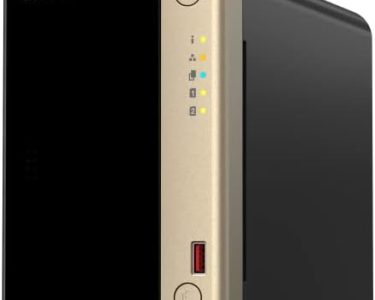
The front panel of the F2-425 houses the two quick-change drive bays, the power button, activity and power lights, and a single 10Gbps USB 3.2 Type-A connection for speedy data copying from the NAS, as shown in the picture at the top of this page. We hope you trust everyone in your home, even though there isn’t a drive-locking system.
The rear panel of the box has an HDMI port, a power jack, two additional 10Gbps Type-A USB ports, a 2.5GbE Ethernet port, and a sizable fan to keep the device cool. I also had to use the pinhole reset button because I couldn’t recall my first password. Fake.
Only slightly quicker than today’s high-capacity hard disk drives (HDDs), which can transmit files at about 275 MBps, but slower than SATA solid state drives (SSDs), which can do so at 550 MBps, is the fastest transfer rate you’ll receive from a 2.5GbE network device, which is 300 MBps. However, you will have extra capacity with the F2-425 because streaming even high-resolution 4K video requires transfer speeds of less than 50Mbps (megabits per second).
The F2-425 has two quick-change drive bays that can hold 2.5- or 3.5-inch HDDs or 2.5-inch SATA SSDs. If you want, you may also hot-swap drives. In the era of NVMe (Non-Volatile Memory Express), HDDs and SATA SSDs may seem outdated, but you can obtain up to 72TB of storage with the former and just 32TB with the latter—and only if you have a pair of VectoTech 16TB V-MAX drives, which cost $1,700 each! With two $250 4TB consumer-grade SATA SSDs (or 4TB if set up in RAID 1), Normies can figure on 8TB.
Additionally, if there is anything important on HDDs, I would advise mirroring them (RAID 1). This decreases the possibility of catastrophic data loss if one drive fails in striped RAID 0, but it also halves the storage. The four-core Intel Celeron N5095 processor and 4GB of DRAM are sufficient to operate the included Linux-based TNAS operating system, but they are not strong enough to support the Roon music server. (Roon advises having 8MB of DRAM and at least an Intel Core i3 processor.)
Features
The F2-425’s photo, audio, and video capabilities will be the most appealing to the typical home user. TerraMaster has its own Multimedia Server that uses DLNA to transmit music and movies. The Digital Living Network Alliance, a trade association Sony established in 2003, is represented by the acronym. It has evolved into the standard for even the more potent (and included) Emby, Plex, and Jellyfin media servers. Although Plex is the most popular choice, you can read TechHive’s reviews of those products by clicking on the links above.
The photographs app uses “AI,” or pattern recognition, to automatically organize photographs according to a number of parameters. Additionally included are an iTunes server and torrent clients.
Client backup
One of my favorite NAS backup programs is TNAS’s Centralized Backup. Naturally, you have the option to install clients for it on your devices and PCs, but you are not required to. You can use Centralized Backup’s SMB (standard Windows file sharing) to access the files if you distribute them across your devices.
To put it another way, share the folders you wish to be backed up, enable file sharing on your computer or device, and then add those folders as sources to a Centralized Backup file server backup.
From there, you may sync your backed-up data to the cloud or from the cloud to the F2-425 using TNAS’s online storage backup program. BackBlaze B2, Google Drive, OneDrive, Amazon S3, Dropbox, Box, Baidu Cloud, Alibaba Cloud, and other commercial services are supported. For Apple users, Time Machine is supported; however, iCloud is not.
In addition, I strongly advise preserving a local copy of your priceless images. Although there haven’t been any significant data losses from a large online repository, the internet is becoming a more dangerous place.
Security cameras
Did you know that hiring internet surveillance companies to keep an eye on your property doesn’t have to cost the earth? In fact, local security systems that used hardwired or IP cameras—Internet Protocol cameras that connect to your local network via Ethernet or Wi-Fi, rather than an online service—were commonplace before the advent of these services. IP cameras are still widely accessible and reasonably priced.
Additionally, IP cameras can still be accessed remotely, but doing so requires setting up your router’s ports so that you can connect to the F2-425 from a location outside of your home network. Alternatively, you can use the simpler and more secure TerraMaster TNAS Web portal/forwarding service.
As a result, TerraMaster offers its Surveillance Manager app (viewed above), which can support numerous ONVIF-compliant (Open Network Video Interface Forum) IP cameras without the need for costly extra licenses that QNAP and Synology boxes normally require. Bravo, TerraMaster!
Performance
Aside from speed, see my evaluation of the TerraMaster D8 SSD Plus in Macworld to see what 10GbE and NVMe have to offer. In summary: Larger NVMe SSDs are expensive, but the best-case speed is nearly 1GBps.
The fact that TNAS is not very good at multitasking is one thing I dislike about it. For example, when installing an app, I was unable to go back to the desktop and launch the file manager. There are four cores, but that isn’t a deal breaker. Let’s take advantage of them!
Conclusion
Although I’ve always suggested QNAP and Synology as the best options for consumer NAS, TerraMaster’s TNAS OS has advanced to the point where it’s equally competent, and the company doesn’t charge exorbitant prices for “extras” like security camera license fees like those other vendors do these days.
For multimedia streaming, backup, home file sharing, and storing video from ONVIF IP cameras, I do recommend the F2-425 as a top option for a two-bay NAS system. Well done, TerraMaster.