 By
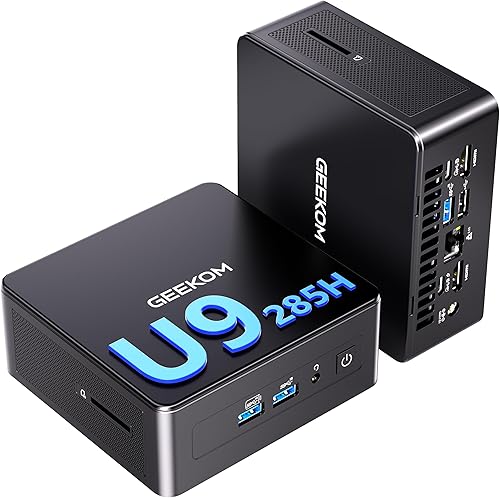
By The Geekom IT15′s small form factor hides the second-generation Intel Core Ultra 9 285H. The manufacturer claims that it supports Windows 11’s AI features and provides sufficient power for daily operations.
The IT15 offers an intriguing substitute for traditional desktop computers, which are becoming less and less useful outside of the gaming industry, thanks to its numerous connections and capacity to run up to four displays at once.
We are especially interested in comparing the Geekom A9 Max with AMD hardware, which we have already tested, with the Geekom IT15 with Intel CPU.
Specifications
- Measurements: W × D × H = 117 × 112 × 45.5 mm without rubber feet and 117 × 112 × 49.2 mm with rubber feet
- 1.32 pounds in weight
- CPU: 285H Intel Core Ultra 9 processor with a 45 watt maximum operational power
- GPU: Intel Arc 140T GPU for 9 285H
- Memory: up to 128 GB of dual-channel DDR5-5600 SODIMM
- Internal storage: 1 × M.2 2280 NVMe PCIe Gen4 x4 SSD with a pre-installed Crucial P3 Plus CT2000P3PSSD8 2 TB
- Expandable: 1 × 2.5 × SATA HDD slot (up to 2 TB per) and 1 × M.2 2242 SATA III SSD slot
- One USB 3.2 Gen 2 Type-A, one USB 2.0 Type-A (back), one USB 3.2 Gen 2 Type-A with S5 power supply, one USB 3.2 Gen 2 Type-A (front), two USB 4.0 ports, one with PD input (rear), one 3.5 mm stereo headphone jack (front), two HDMI 2.0 ports, and an SD card reader 4.0 port
- Bluetooth 5.4, Wi-Fi 7, and 1 x 2.5G RJ45 connectivity
- Extras VESA mount and Kensington lock
- Operating system: pre-installed Microsoft Windows 11 24H2 (64-bit)
- Three-year warranty
Design
The A9 Max’s gray metal case is more fashionable than Geekom’s black case, which contains the hardware. The metal base and lid of the IT15 are designed to support up to 200 kg, giving the inside components strong protection.
The tiny PC, which measures 117 x 112 x 45.5 mm (A9 Max: 132 x 46.9 mm), is suitable for any desk and can be fixed to a wall or the back of a display using a VESA bracket.
Ports are found on both the front and the rear, as is common with micro PCs. The side with the power button is regarded as the front, regardless of how the computer is set up on the desk.
With a total of six USB ports, spanning from USB 2.0 and USB 3.2 Gen 2 to USB 4.0 Type-C, Geekom hasn’t been frugal with connectivity. This enables fast connections—up to a theoretical 40 Gbps—between external disks and peripherals.
For up to four 4K displays, there are two USB 4 connectors and two HDMI 2.0 interfaces. But there isn’t a DisplayPort.
Bluetooth 5.4, Wi-Fi 7 (Intel BE200), 2.5 Gbps Ethernet, and a complete SD card reader are additional parts. A Kensington lock can be used to protect the small PC against theft.
Equipment
The Intel Core 9 285H is the focal point of the Geekom IT15. As an alternative, the IT15 can be purchased with an Intel Ultra 5-225H processor and 32 GB of RAM, although it only has a 1 TB SSD.
Developed for high-performance laptops, the Intel Core Ultra 9 285H is a contemporary high-performance processor from Intel’s current “Arrow Lake H” series.
It has a total of 16 cores and 16 threads since it combines six performance cores, eight efficiency cores, and two more low-power efficiency cores. The chip offers a solid foundation for demanding workloads with a 24 MB smart cache and a maximum boost speed of up to 5.4 GHz.
Its normal power usage is about 45 watts, but in turbo mode, it can reach up to 115 watts; adequate cooling is crucial. Geekom uses their proprietary “IceBlast 2.0” cooling system, which consists of two heat pipes, a sizable heat sink, and silent fans.
With eight Xe cores and ray tracing capability, the Intel Arc 140T is the integrated GPU of the Intel Core Ultra 9 285H. It is built on the Xe architecture. It provides powerful graphics performance for a CPU and is ideal for daily use, multimedia, content production, and light gaming. Its excellent integration with the CPU system, great efficiency, and contemporary technology are its main advantages. However, it lacks the power of a dedicated graphics card for demanding games or professional 3D tasks.
Two 16 GB modules totaling 32 GB of DDR5 RAM (5,600 MT/s) are available to the processor. Functionally speaking, this is acceptable, however upgrading to 64 GB later on would be challenging since both modules would need to be changed. Expansion would be far simpler and less expensive with a single 32 GB module. Nevertheless, using a single module would not allow you to take advantage of the speedier dual-channel option.
Our IT15’s 2 TB NVMe SSD is a Crucial P3 Plus (model CT2000P3PSSD8). Other IT15 machines can have SSDs from various manufacturers.
Windows
In our test configuration, the IT15 is linked to a 27-inch Dell monitor, a wired Cherry keyboard, and a Microsoft mouse via a dongle. A 2.5 Gbps BrosTrend 8X switch is used to connect the small PC to the network via Ethernet.
A hardware-bound license for Windows 11 24H2 is included with the Geekom IT15. The Windows installation starts as soon as the small PC boots up for the first time and takes a few minutes to finish. Although Windows provides further updates later, updates are installed during setup. Then an odd issue arises.
An error notice appears when Windows offers the Windows 11 25H2 update. The Keep personal files and programs option is grayed out when utilizing an ISO file for an alternative in-place update. The problem seems to be caused by the pre-installed Windows’ improper language settings.
As a result, we chose to save solely personal files, which is not an issue with a brand-new Windows installation. The in-place upgrade with an English setup ISO is an additional option. The new Windows 25H2 launches with an interface in German after the installation is completed in that language.
The specific Intel drivers should be installed in addition to the drivers and upgrades that come with Windows. The free Intel Driver and Support Assistant, which installs the most recent drivers for Bluetooth, Wi-Fi, Arc Graphics, and the NPU, is the simplest way to accomplish this.
Performance
To gauge desktop performance, By doing routine operations, this program provides us with accurate values. The Geekom IT15 with an Intel Core 9 285H is in the top third with a score of 8,341. We tested the Geekom A9 Max against the AMD Ryzen AI 9 HX 370, and it received 7,976 points—just 4% fewer.
This illustrates the Intel Core 9 285H’s performance in relation to AMD and Qualcomm CPUs.
When the Geekom IT15’s gaming graphics performance was evaluated with 3DMark Steel Nomad Light, it received 3,393 points (Geekom A9 Max: 3,279 points), which is a respectable score that is marginally above average. 4,244 points were obtained using the Time Spy benchmark. Compared to the A9 Max with its AMD processor, which received 3,701 points, that is substantially higher.
Conclusion
Strong Intel performance, cutting-edge AI support, and a wealth of features make the Geekom IT15 stand out in the test. The integrated Arc 140T GPU provides strong graphics performance, while the Intel Core Ultra 9 285H provides ample power for work, multimedia, and light creative activities.
The small PC is adaptable and future-proof with Wi-Fi 7, Bluetooth 5.4, USB 4, and compatibility for up to four 4K monitors. The loud fan under load, the lack of Thunderbolt 4, and the restricted RAM upgrade options are among the complaints. All things considered, the IT15 is a small, effective, and potent mini PC that is perfect for professional and industrious users.