 By
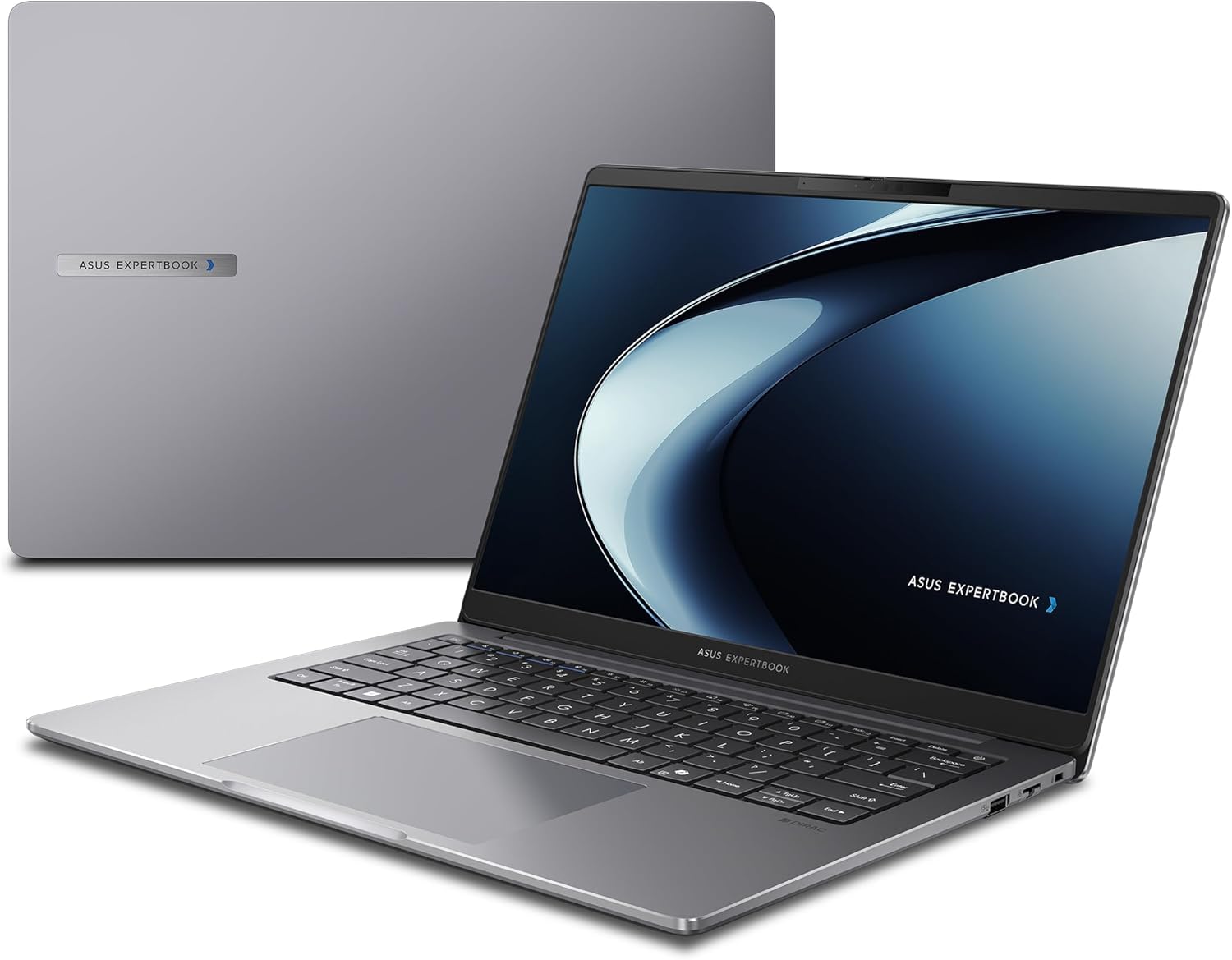
By The 14-inch Asus ExpertBook P3 is a work-focused Copilot+ PC with AMD internals that give high speed and an unexpectedly attractive body with an all-metal build quality, a quick keyboard, and exceptionally strong speakers. The significant multithreaded CPU speed here will be more significant to many workers than a laptop that might potentially be powered down for a full day.
Here, Asus offered a fantastic package, and for the most part, I like it. My review model’s display didn’t really impress me, and the webcam is a drawback. However, in terms of CPU performance, the entire package is significantly better than the typical Copilot+ PC and better than the typical business laptop.
Specification
A business laptop with an AMD Ryzen AI processor is the Asus ExpertBook PM3406CKA. An AMD Ryzen AI 7 350 processor, Radeon 860M graphics, 32GB DDR5 RAM, and a 1TB solid-state drive were included in our review unit. At the time of the review, Asus was selling it for $1,229 on Amazon instead of the $1,479 mentioned on their website.
AMD’s Ryzen AI hardware offers an amazing combination of traditional x86 hardware (unlike Qualcomm Snapdragon X), strong multithreaded CPU performance (unlike Intel Lunar Lake), and a Copilot+ PC-ready NPU (unlike Intel’s other hardware), even though it can’t quite match the battery life of Qualcomm Snapdragon X or Intel Lunar Lake hardware. The battery life is still good. Simply put, it doesn’t have the 20+ hour runtimes that I’ve observed on Qualcomm Snapdragon X Elite and Snapdragon X Plus hardware and Intel Lunar Lake.
Models of this computer with an AMD Ryzen AI 5 330 CPU and AMD Radeon 820M graphics were available from Asus for $949 at the time of the review.
- Asus ExpertBook PM3406CKA model
- AMD Ryzen AI 7 350 CPU
- 32GB DDR5 RAM (5600 MT/s) of memory
- GPU/Graphics: AMD Radeon 860M
- AMD NPU (up to 50 TOPS)
- Display: 14-inch 1920 x 1200 IPS screen with a refresh rate of up to 60 Hz
- 1 TB PCIe Gen4 SSD for storage
- 1080p webcam
- Connectivity includes two USB Type-C (USB 3.2 Gen2), two USB Type-A (USB 3.2 Gen1), one HDMI 2.1, one combination audio port, one RJ-45 Gigabit Ethernet, and one Kensington Nano lock slot.
- Networking: Gigabit Ethernet, Bluetooth 5.4, and Wi-Fi 7
- Biometrics: Windows Hello’s fingerprint sensor and infrared camera
- 70 Watt-hours of battery capacity
- Measurements: 12.31 x 8.94 x 0.71 inches
- 3.6 pounds in weight
- MSRP as tested: $1,479
Design and build quality
The chassis of the Asus ExpertBook P3 is made entirely of metal. According to Asus, it has a “robust aluminum build” and satisfies US MIL-STD 810H testing requirements for performance in challenging circumstances. Although I don’t drop laptops or expose them to sandstorms as part of my evaluation process, this machine seemed really sturdy.
In terms of design, you get a silver chassis with a black keyboard and a black display bezel. The laptop’s keyboard tray has shinier beveled edges. It feels and looks like a very professional, tough business laptop.
The 3.6-pound chassis and 14-inch all-metal construction feel well-designed. I can open the laptop’s display with only one hand, unlike many computers, and even the hinge feels well thought out. I can open the machine without using two hands thanks to the hinge, which also retains the display neatly in place.
Keyboard and trackpad
The chiclet keyboard on the Asus ExpertBook P3 has a key travel depth of 1.5 mm. It was enjoyable to text on, and it seems responsive and quick. It is readable in low light thanks to the white backlight.
Additionally, the huge trackpad feels great. The tactile feel of the click-down movement is especially pleasant; after you click it down, it rapidly bounces back. The surface was sensitive and smooth. Although I like haptic trackpads, this mechanical trackpad is pretty good.
Display and speakers
The 14-inch IPS display on the Asus ExpertBook P3 features a resolution of 1920 x 1200 and a refresh rate of 60 Hz. The refresh rate is mediocre, but the resolution is respectable. The brightness is the main issue. There’s no denying that this isn’t a very impressive display, with a maximum brightness of only 300 nits.
This is typical for work-oriented PCs, which prioritize other specifications over a visual “wow” effect and typically choose displays that offer longer battery life. In difficult lighting situations, its display is easier to view thanks to its lovely anti-glare coating. The display will likely be the biggest disadvantage for those who use this PC on the move; increased brightness would be a huge improvement.
For a business device in this price bracket, this laptop’s speakers sound quite well. Songs like Steely Dan’s Aja, a usual benchmark for audiophiles, have more bass than I would anticipate, get loud enough, and have bright, sharp high notes.
Connectivity
The Asus ExpertBook P3 has a great number of ports. Two USB Type-C ports, a USB Type-A port, an HDMI 2.1 port, and a combination audio jack are located on the left. This device features an RJ-45 Ethernet jack, a Kensington Nano lock slot, and a second USB Type-A port on the right.
Though there isn’t an SD card reader, that is a great assortment of connections, including Ethernet. Additionally, as this machine uses USB Type-C for charging, the charging cable must always be plugged into the left. However, I wish the device had USB Type-C ports on both sides. There are no Thunderbolt or USB4 ports here because the USB Type-C ports are USB 3.2 Gen2.
The Asus ExpertBook P3 has the newest cutting-edge wireless technology, thanks to its compatibility with Bluetooth 5.4 and Wi-Fi 7. When paired with Gigabit Ethernet, this device can be used in a variety of mobile network configurations.
Performance
Web browsers, office suites, communication tools, and the kinds of Windows desktop applications that most employees would use on laptops like this one were among the daily productivity chores that the Asus ExpertBook P3 excelled at.
To evaluate the Asus ExpertBook P3’s performance, we put it through our typical benchmarks.
To gain a sense of the overall system performance, we first run PCMark 10. The Asus ExpertBook P3 outperformed Intel Lunar Lake-powered Copilot+ PCs with a PCMark 10 score of 7,636.
We then launch Cinebench R20. This benchmark emphasizes total CPU performance and is highly multithreaded. Since it’s a fast benchmark, cooling over prolonged workloads is not an issue. However, CPUs with more cores have a significant advantage because it is highly multithreaded.
The Asus ExpertBook P3’s eight cores and 16 threads outperformed Intel’s eight-core Lunar Lake technology, which prioritizes efficiency over multithreaded CPU performance, with a multithreaded Cinebench R20 score of 6,213.
Battery life
A 70-watt-hour battery powers the Asus ExpertBook P3. I would anticipate a respectable laptop battery life when paired with AMD Ryzen AI 7 350 technology, but not the longest possible ultraportable battery life. And the benchmarks demonstrated precisely that.
We play a 4K version of Tears of Steel repeatedly on Windows 11 with airplane mode enabled until the laptop suspends itself in order to test the battery life. We had to increase the laptop’s display brightness because we set the screen to 250 nits of brightness for our battery testing. Since local video playback is so effective, this is the best-case situation for any laptop; nevertheless, actual battery life in daily use will always be lower than this.
The average lifespan of the Asus ExpertBook P3 was 768 minutes, or 12.8 hours. You might be able to squeeze a whole workday of battery life out of it, but only just barely, depending on your workload and screen brightness. The battery life is acceptable, but selecting AMD Ryzen AI hardware comes with a trade-off. They have a respectable power efficiency; however, the higher power consumption comes at the expense of greater performance compared to Intel Lunar Lake and Qualcomm Snapdragon X technology.
Conclusion
The Asus ExpertBook P3 is a fantastic laptop that combines an all-metal construction with “AI PC” hardware that offers a powerful CPU and an NPU capable of driving Microsoft’s Copilot+ PC capabilities. Furthermore, for a computer with 32GB of RAM and a 1TB solid-state drive, the price—roughly $1,200 to $1,400, depending on the sale pricing—is a great deal.
The display is the primary drawback because many people would want something brighter and possibly higher resolution. Battery life is the other drawback. For professionals with light workflows, chips like Intel and Qualcomm will offer significantly longer battery life at the expense of top-tier CPU performance. However, this is a sturdy laptop with good performance, a respectable battery life, and an affordable price. It’s an excellent laptop.