 By
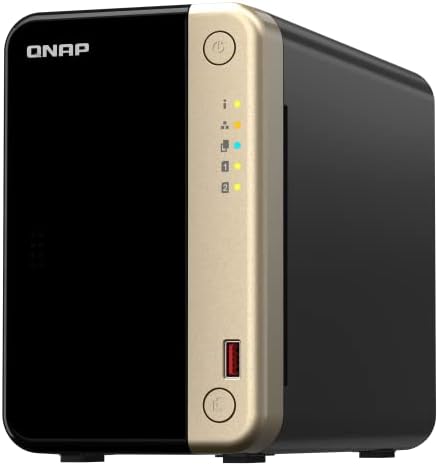
By An expensive NAS enclosure for homes and home offices is the QNAP Turbostation TS-264-8G network storage. However, the two-bay NAS server is quite well-liked. In this review, we investigate the causes.
Features
On the QNAP Turbostation TS-264-8G NAS system, two key features stand out immediately: the four-core Intel Celeron N5095 CPU has a maximum clock speed of 2.9 GHz. It includes the Intel UHD Graphics graphics unit, which is designed to handle several tasks at once. Additionally, it has 8GB of RAM (DDR4 SODIMM). With a second 8GB module, this generous RAM configuration may be increased to 16GB, which is impressive for a home server.
The two hard drive bays can hold SSDs or the more compact 2.5-inch models in addition to the traditional 3.5-inch HDDs. Additionally, the QNAP TS-264-8G provides adaptable upgrade options: The network storage can be increased with NVMe SSDs because of the two M.2 slots. They can be set up as extra storage space or as cache accelerators.
Additionally, there is an embedded PCIe 3.0 slot that may be used to add more NVMe SSDs or a 10GbE LAN port using expansion cards made by the vendor. There aren’t many more upgrades available in this NAS class.
The front of the case has a USB 3.2 Gen2 port with a copy feature. One HDMI port, two USB 2.0 ports, and a normal USB-A port are located in the back. By enabling the connection of a display, the HDMI connector aims to streamline virtualization applications by enabling the NAS system to function as a computer.
The rich features are completed with two 2.5GbE LAN ports. Link aggregation can even be used to combine the two Ethernet ports.
The QNAP TS-264-8G’s high output power
The QNAP Turbostation TS-264-8G NAS server does well in the tests, even in the absence of upgrading possibilities. Two NAS HDDs, specifically the 3.5-inch Seagate Ironwolf ST4000NE001 models with 4TB capacity each, are utilized. They are set up in a RAID 1 network. For this purpose, we merely utilize one of the two 2.5-gigabit LAN ports.
Data transfer rates are really remarkable, even in test runs using NAS Performance Tester: The QNAP device reads the 8,000MB package at over 285MB/s and writes it at a respectable 247MB/s. Smaller data packets make it even faster; in the 400MB run, for instance, it wrote at over 252MB/s and read at a respectable 296MB/s.
What is not obvious: The practical runs validate the excellent performance. The QNAP Turbostation TS-264-8G network storage gets a respectable 223MB/s in writing and 261MB/s in reading when copying the 4K movie Tears of Steel back and forth. These are fresh records in the test field in both situations.
When writing our 2GB backup, a nice 42MB/s is also a top result. When writing backups and movies at the same time, the TS-264-8G comes in close to the top with over 103MB/s.
Uncomplicated setup
The QNAP Turbostation TS-264-8G NAS server can be configured without the requirement for a NAS expert. Using clips, the 3.5-inch HDDs can be fastened to the holders without the need for tools.
The commissioning process begins with simple steps, including checking the firmware version, creating an account, and choosing your time zone as soon as you click on the notice. Additionally, you can indicate here whether you wish to use a static IP address or an automated one to access the NAS system. Before initialization begins, you will receive a summary of the settings made, as is customary with QNAP.
A step-by-step tutorial will appear on the right side of the screen after the firmware has been installed. For instance, you establish the storage pool, decide on the snapshot storage allocation, and set the RAID mode.
Once more, the creation of the storage pools is preceded by a synopsis. Giving the NAS server time overnight is the best option because this takes time. Next, indicate your volume or volumes.
The QTS firmware is where you configure the NAS. It is arranged graphically, just like the majority of NAS makers these days. QNAP is well-known for its vast app store, which is referred to as the App Center here. You can use this to add other features. For instance, you can install media servers like Plex, Minim, or Kazoo on the NAS while simultaneously safeguarding it from infection.
All the necessary parameters are available in the extensive QTS firmware. Like the NAS rival, key sections like “Storage & Snapshots” are easily accessible and immediately on the UI.
Special feature: Because of the ZFS file system, you may also use this network storage to convert to the QuTS hero operating system, which is especially appropriate for mixed storage made up of HDDs and SSDs. However, at least QTS version 5.2.1 is needed to transition.
Environment and health
The power consumption of 2.5GbE network storage is higher than that of similar 1GbE NAS systems, as is always the case. We have already observed this in the QNAP TS-264-8G test when the system consists solely of HDDs.
The measuring equipment displays a maximum of 33.7 watts when in operation. Additionally, there is a discernible increase in energy usage even in idle and sleep mode, which use 26.5 and 16.8 watts, respectively. Even while this value is also rather high, the fact that the device still consumes 1.9 watts when turned off is no longer extremely important.