 By
By The two-bay TerraMaster F2-425 NAS was created with small and medium-sized businesses (SMB) in mind, although it can also be utilized at home. TerraMaster’s years of experience are evident in the NAS’s layout, configuration, and operation. It works well for everyday usage, whether backing up files or using it as a home media server, starting with the simple installation of the disks and the methodical initialization process.
Its quietness was one of its best qualities throughout testing. This tiny two-bay NAS stayed nearly silent for the entire three weeks it was sitting next to my router, whereas other larger systems would whirr up under demand. The first setup is simple and doesn’t require any tools. The drive is secured in place by simply removing the retaining strips on either side of the caddy, inserting it into the drive, and then pushing the strips back in. The big lever locks on the front is then used to slide it back into the machine. It locks after clicking into position. After installing the drives, turn on the machine, confirm that it is connected to the network, and proceed to your computer.
One of the increasing number of NAS systems that make use of both desktop and browser-based access is the F2-425. You may configure the drives if you download the TNAS PC software for Mac or PC, which handles all the setup complications. It takes no more than ten minutes to complete the entire process. After it’s finished, you can start moving files straight to the NAS, which shows up on your computer’s network drive and can be used just like any other. You’re also given instructions on how to set up your first pool.
It is much more compatible with higher-functioning apps because it uses the latest Intel CPU. This implies that you can turn the NAS into a private cloud server by downloading ready-to-use solutions like TerraSync. I’ve used this a lot because it lets me transfer files and store them on the server without having to pay for services like WeTransfer. Docker is supported, and you can build up your own web server for web development or video, just like with higher-quality PCs. The iTunes server functions flawlessly, and the Plex Media Server is also accessible for offline media files.
Price & Availability
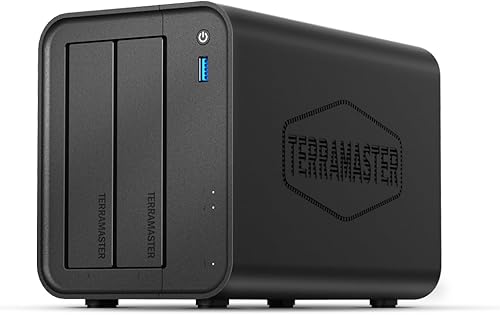
The TerraMaster F2-425 is priced at US$319/£319 and is readily accessible. In addition to being offered via online merchants like Amazon.com and Amazon.co.uk, it may be bought directly from the TerraMaster website. The TerraMaster F2-425’s straightforward design is among the first things you notice. Compared to two 3.5-inch HDDs, the compact size is not significantly larger. Before drives are fitted, the external enclosure weighs 1.5 kg and has dimensions of 222 x 193 x 154 mm. This is further enhanced by the external power adaptor.
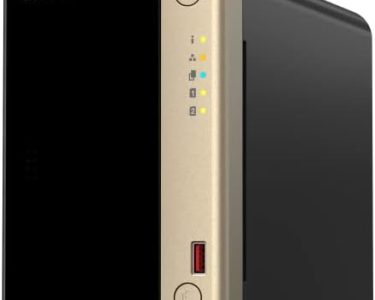
This gadget needs AC power and a network router to plug into, and it is intended to be a permanent fixture in your house or business. Three tiny status LEDs and a single USB 3.2 port for external drives are located on the front. The bottom LED shows network connectivity, while the top two show drive presence and condition.
Compared to the standard ARM CPUs available in entry-level NAS devices, the F2-425 boasts an Intel N5095 quad-core processor. It strikes an excellent balance for the price when combined with 4 GB of DDR4 RAM and UHD graphics.
It has a single RJ-45 2.5 GbE connector for network access, which provides comparatively quick rates. Unfortunately, there is just one. Drives can be set up in RAID 0, 1, or TRAID. After configuration is finished, drives will enable hot-swap, which allows you to swap out a disk without shutting down the system. Additionally, you can choose between the Btrfs and EXT4 file systems.
Dropbox, OneDrive, Google Drive, and other services offer cloud sync. You can also use the storage as your own cloud by using the TerraMaster Cloud Sync software. As a small business, I find this functionality to be quite helpful, especially given the recent increase in cloud storage and transfer prices. The TOS operating system offers mobile apps, enterprise-grade security, and remote access. Higher-end applications, such the AI-powered picture album that provides basic face, animal, and scene recognition, can be installed on the Intel CPU.
Supported applications include Docker and VirtualBox. I ran a simple WordPress web server on the NAS, and it worked far better than I had anticipated. For small offices that don’t rely on Google or Microsoft for file sharing, user management is very simple and allows for the assignment of access privileges. The Intel CPU improves interoperability and makes it possible to set up iTunes servers, VPNs, CCTV backups, and more.
Performance
The F2-425 is intended for NAS system novices. Installing drives is rapid thanks to the tool-free caddies and easy setup. The installation process for 3.5″ HDDs and 2.5″ SSDs is identical. After installation, all you have to do is connect it to the network and plug in the AC power. The NAS will then show up if you are connected to the same network once you download and install the TNAS software on your PC. After following the setup instructions, storage is set up and prepared for app installation in a matter of minutes.
I successfully installed TerraPhoto, Docker, TerraSync, USB Copy, Document Manager, iTunes Server, Jellyfin, and Plex for testing. Additionally, web development was successful. I set up WordPress, phpMyAdmin, MariaDB, and Terra Web Server. The performance for local web development was outstanding and a significant improvement over using MAMP on my local PC, despite the fact that the initial setup necessitates knowledge and a significant amount of setup.
Additionally, the network’s media playback was quite seamless. The system’s 2-bay design, which restricts growth, is the only significant limitation I could see, but this is a starting NAS. Additionally, there is no redundancy with just one network port, and USB ports are only used for USB Copy file transfers—not for extension. Fan noise only became noticeable during prolonged picture or video processing, and it was negligible for daily use and significantly less than many larger NAS systems.
One of those services that, once you start using it as a small business, makes you wonder how you were able to operate previously is remote access and user setup. Even though the setup isn’t as simple as it may be, I was able to find sufficient internet instructions to help me with the connection process. Beginners may use the TOS program effectively, but more complex configurations, such as web servers, call for some technical expertise.
Conclusion
The TerraMaster F2-425 is a fantastic choice if you’re a home office worker, small or medium-sized corporation, or creative studio looking to get started with network-attached storage. It offers two bays that can store up to 60 TB of data, both locally and remotely. Once again, the TOS operating system is incredibly user-friendly and well-designed. Although both require some practice, there are instructions for more complicated things like iTunes and web servers, and I couldn’t help but believe that some of the procedures could have been much simpler because connecting requires some technical understanding about IPs, etc.
It is really simple to use NAS for more common functions like backing up servers, network storage devices, and macOS Time Machine. Both the Plex and iTunes servers performed admirably, while the iTunes server required a little more maintenance. The F2-425 is a fantastic place to start when it comes to entry-level NAS systems, and it should satisfy the majority of small business storage requirements.